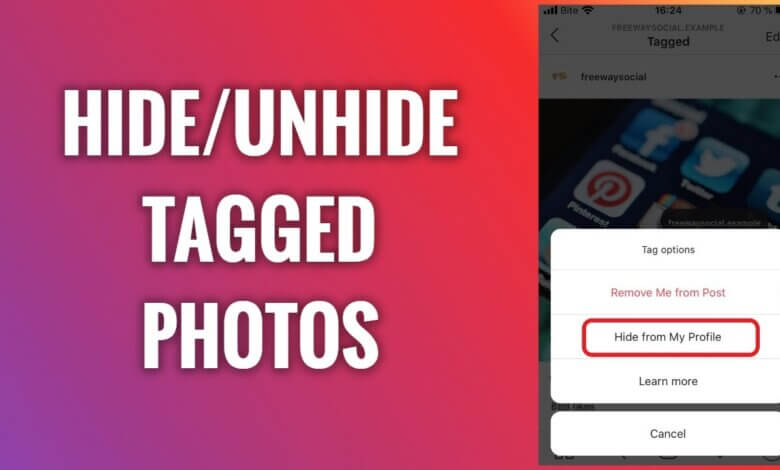
Cov duab Instagram uas muaj cim npe yog ib txoj hauv kev zoo los txuas koj qhov profile nrog cov ntsiab lus uas cov phooj ywg, tsev neeg, thiab cov neeg ua raws tau sib koom. Thaum ib tug neeg cim koj hauv ib daim duab, daim duab ntawd tuaj yeem tshwm sim hauv ntu Tagged ntawm koj qhov profile, ua rau nws pom rau txhua tus neeg uas tuaj xyuas koj nplooj ntawv. Txawm hais tias qhov feature no pab qhia txog kev nco thiab kev sib txuas lus hauv zej zog, nws tsis tas li qhia txog koj xav nthuav qhia koj tus kheej hauv online li cas. Tsis yog txhua daim duab cim npe zoo nkauj, tsim nyog, lossis tsim nyog rau kev tso saib rau pej xeem.
Raws li Instagram tau hloov zuj zus, nws tau muab kev tswj hwm ntau dua rau cov neeg siv rau lawv tus kheej digital thiab kev ceev ntiag tug. Ib qho ntawm cov cuab yeej muaj txiaj ntsig tshaj plaws - tab sis feem ntau tsis quav ntsej - yog lub peev xwm los zais thiab qhib cov duab uas tau cim. Qhov feature no tso cai rau koj tswj hwm cov ntawv tshaj tawm uas tau cim tshwm sim ntawm koj qhov profile yam tsis tau tshem tawm tag nrho lossis ua rau tus neeg uas tshaj tawm nws chim siab. Cov duab uas tau cim zais tsis raug tshem tawm; lawv tsuas yog raug tshem tawm ntawm pej xeem pom ntawm koj qhov profile, muab kev ywj pheej thiab kev thaj yeeb nyab xeeb rau koj.
Kev kawm paub zais cov duab uas muaj cim npe yuav pab tau tshwj xeeb yog tias koj tab tom tsim ib daim duab tshaj lij, khiav ib tus neeg tsim khoom lossis tus account lag luam, lossis tsuas yog sim ua kom koj qhov profile huv si thiab teeb tsa zoo. Tib lub sijhawm, Instagram ua rau nws yooj yim rau kev qhib cov duab tom qab, cia koj rov qab pom thaum twg koj hloov siab. Hauv phau ntawv qhia no, peb yuav taug kev los ntawm yuav ua li cas zais thiab qhib cov duab uas muaj cim npe Instagram ib kauj ruam zuj zus, pab koj tswj hwm tag nrho ntawm koj tus kheej li cas thoob plaws lub platform.
Yuav ua li cas kom tshem tawm cov duab uas tau cim tseg hauv Instagram?
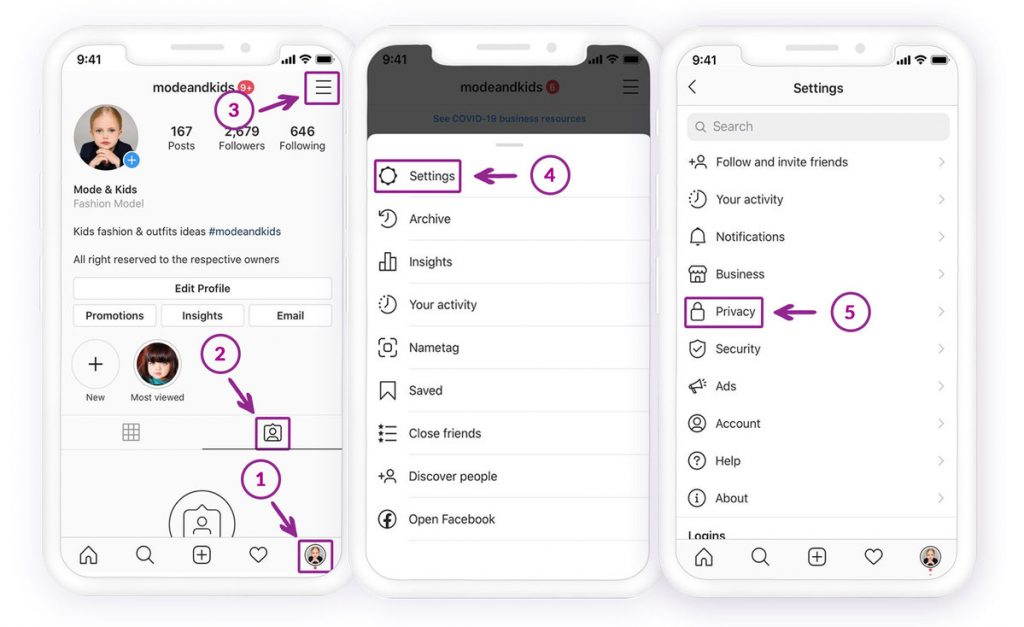
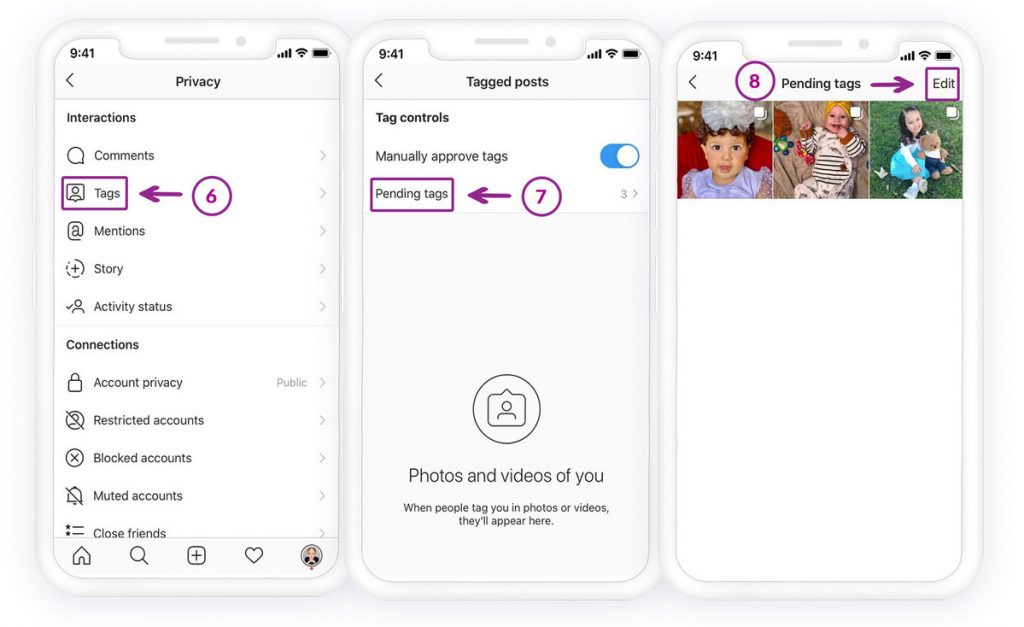
Yuav kom pom cov duab Instagram uas tau cim npe, koj yuav tsum mus rau ntu Tags hauv qab Privacy.
Yuav kom tsis txhob zais cov duab uas muaj cim npe rau Instagram:
- Qhib lub Instagram app thiab mus rau koj qhov profile los ntawm kev coj mus rhaub rau daim duab profile lossis lub npe neeg siv hauv tsev.
- Nrhiav daim duab uas tau cim thiab xyuas seb cov duab puas twb muaj lawm (tom qab ntawd koj tuaj yeem siv txoj kev saum toj no thiab qhib qhov zais ncaj qha los ntawm Instagram profile)
- Coj mus rhaub rau ntawm lub cim hamburger nyob rau sab xis saum toj
- Mus rau Kev teeb tsa
- Qhib lub Kev Ceev Ntaub Ntiag Tug
- Nrhiav Cov cim npe. Koj yuav tsum pom cov duab uas tau cim tseg (nrog lawv tus lej), qhib nws.
- Coj mus rhaub rau ib daim duab twg uas koj xav kom tsis txhob zais
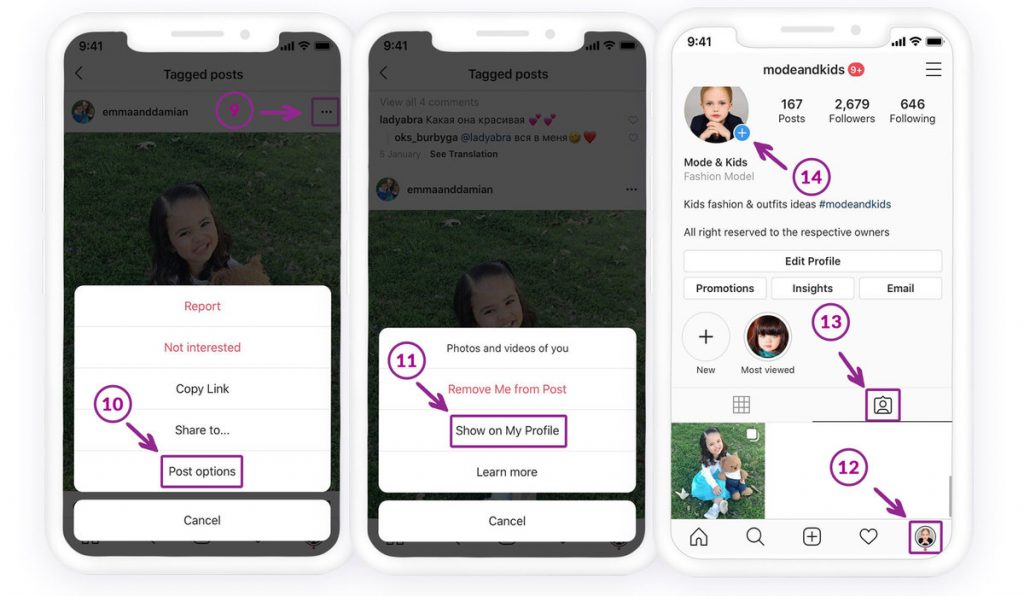
- Coj mus rhaub rau ntawm lub cim peb-dot nyob rau sab xis saum toj ntawm daim duab xaiv
- Koj yuav tsum pom Cov Kev Xaiv Tshaj Tawm.
- Coj mus rhaub rau Qhia rau ntawm kuv qhov Profile
Koj tuaj yeem pom cov duab uas tau cim rau ntawm koj qhov profile hauv ntu cim yog tias koj rov qab mus rau koj qhov profile.
Yuav ua li cas zais cov duab uas tau cim tseg hauv Instagram?
Yog tias koj tsis xis nyob qhia cov duab uas muaj cim rau ntawm koj lub Instagram, tshem koj lub npe lossis zais nws ntawm koj qhov profile. Ob qho kev xaiv muaj.
Txoj Kev 1: Nkaum cov duab uas tau cim ncaj qha los ntawm koj qhov profile
Yog tias koj tab tom nrhiav cov duab uas tib neeg tau cim koj rau hauv, koj tuaj yeem mus rau koj cov duab nplooj ntawv profile ntawm Instagram Nyem rau ntawm lub cim hauv qab koj daim ntawv qhia txog koj tus kheej. Yog tias leej twg tau cim koj hauv daim duab, koj tuaj yeem pom nws nyob ntawd.
Koj tuaj yeem nias rau ntawm daim duab; muaj ob txoj kev xaiv: tshem kuv tawm ntawm qhov kev tshaj tawm, thiab nkaum ntawm kuv qhov profile. Nias rau ntawm lub pob kom qhib "Nkaum ntawm Kuv Qhov Profile." Nws yuav ploj ntawm koj qhov profile rau koj cov neeg ua raws li koj thiab.
- Qhib Instagram app, thiab los ntawm kev coj mus rhaub rau daim duab profile, mus rau koj qhov pub.
- Nrhiav ntu cim npe thiab qhib nws kom pom cov duab Instagram-tagged.
- Thov coj mus rhaub rau ntawm daim duab uas koj yuav zais.
- Coj mus rhaub rau ntawm lub cim peb-dot kom pom ob peb txoj kev xaiv
- Xaiv Hide from my profile nyob ntawd
Txawm li cas los xij, yog tias koj twb tshem tawm ib daim cim npe lawm, cov duab yuav tsis nyob hauv ntu duab uas tau cim npe, tshwj tsis yog tias muaj ib tug neeg cim koj dua.
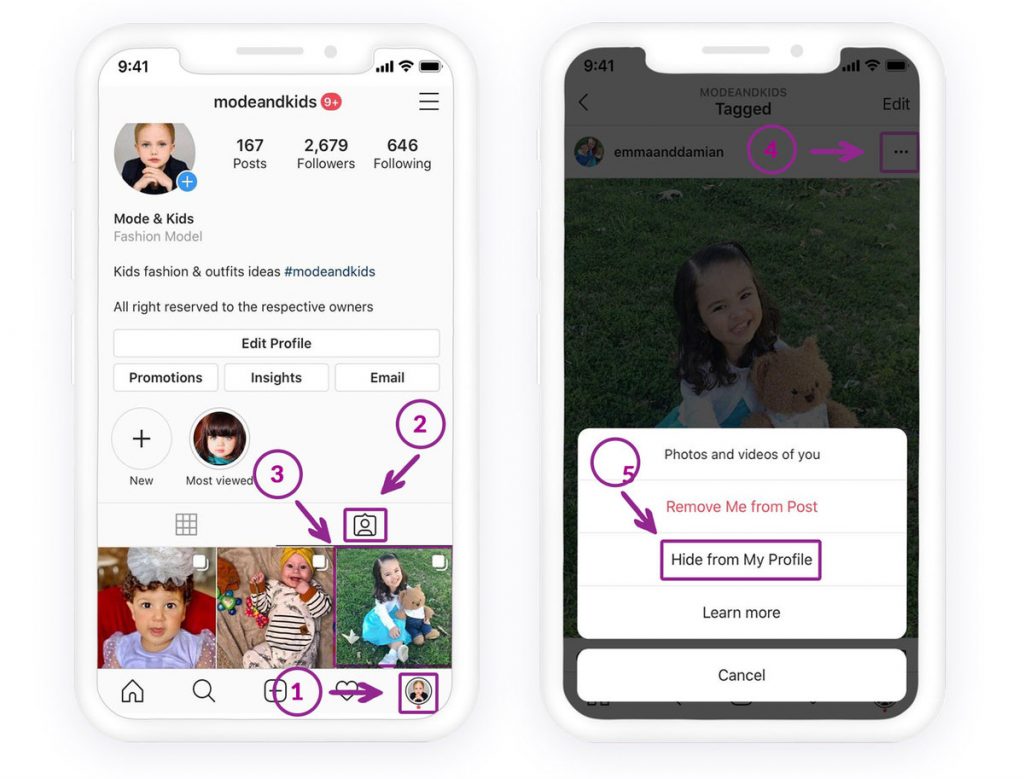
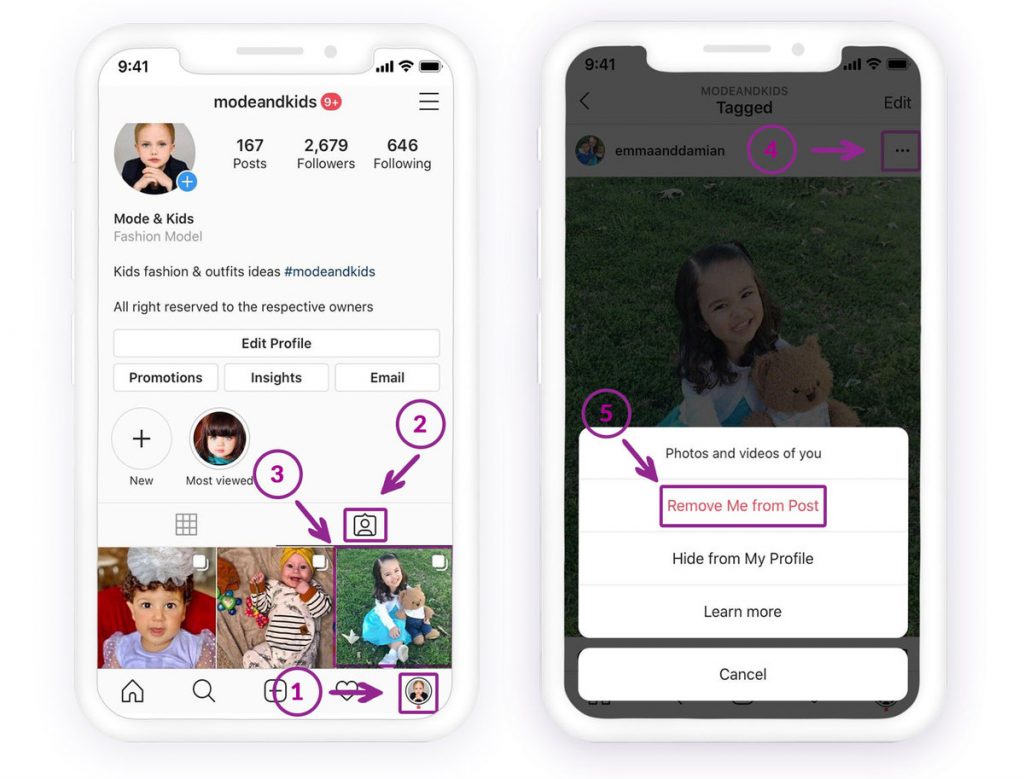
Txoj Kev 2: Tshem koj lub npe ntawm cov duab uas tau cim
Yuav ua li ntawd, rov ua cov lus qhia ua ntej. Thaum kawg, xaiv Tshem Kuv ntawm qhov kev tshaj tawm. Yog li, qhov kev tshaj tawm yuav tsis tshwm sim ntawm koj qhov Instagram pub.
Koj tuaj yeem tshem koj lub npe tawm ntawm cov ntawv tshaj tawm hauv ntu Tags ntawm Instagram hauv Chaw> Kev Ceev Ntaub Ntiag Tug.

Qhov Zoo Tshaj Plaws Xov Tooj Nrhiav App
Tshawb nrhiav Facebook, WhatsApp, Instagram, Snapchat, LINE, Telegram, Tinder thiab lwm yam social media apps yam tsis paub; Taug qab GPS qhov chaw, cov lus ntawv, cov neeg tiv tauj, cov cav hu xov tooj thiab ntau cov ntaub ntawv yooj yim! Muaj kev nyab xeeb 100%!
Yog koj rov qab mus rau Instagram feed thiab coj mus rhaub rau ntawm ntu tagging, koj yuav tsis pom cov duab lawm. Koj tuaj yeem nrhiav cov duab uas tau muab cim zais rau ntawm Settings > Privacy > Tags.
Yuav ua li cas cim cov neeg hauv Instagram?
Yog koj xav paub yuav ua li cas tag cov neeg, thaum koj upload ib daim duab, koj tuaj yeem pom hauv qab ntawm daim duab. Koj tuaj yeem coj mus rhaub rau ntawd thiab sau lub npe neeg uas koj yuav tag.
Txawm tias koj tau tshaj tawm ib daim duab lawm los xij, koj tuaj yeem mus rau qhov ntawv tshaj tawm. Hauv kaum sab laug saum toj ntawm daim duab, coj mus rhaub lub cim thiab xaiv kho. Thaum qhov kev hloov kho qhib, koj tuaj yeem coj mus rhaub rau ntawm lub cim cim thiab sau cov npe neeg siv uas koj xav cim.
Nws yog ua tau rau tshem tawm daim duab Instagram uas tau muab zais cia ntawm koj rov qab mus rau koj qhov profile yog tias koj tsis tau tshem daim cim npe ntawm daim duab. Yog tias koj tau tshem ib daim cim npe, ib tug neeg yuav tsum tau cim koj dua hauv daim duab.
Puas tau muaj leej twg tau raug cim rau ntawm cov duab spammy lossis tsis zoo hauv Instagram uas koj tsis xav kom muaj nyob rau ntawm koj qhov profile? Zoo li daim duab ntawm koj lub ntsej muag qaug cawv ntawm koj tus phooj ywg lub tshoob lossis cov ntawv tshaj tawm spam los ntawm ib tus account lag luam tsis paub. Kuv nyob ntawm no los qhia rau koj tias koj tuaj yeem tshem tawm koj tus kheej ntawm cov duab tsis xav tau.
Auj! Puas yog? Tsis txhob txhawj, kuv yuav pab koj ua qhov no. Ua raws li cov kauj ruam, thiab koj yuav zoo.
Ib yam li Facebook, koj tuaj yeem tshem tawm koj cov duab lossis cov duab uas koj tsis xav tau uas tsis yog koj li sai sai!
Yog koj xav pom koj cov duab uas muaj cim npe:
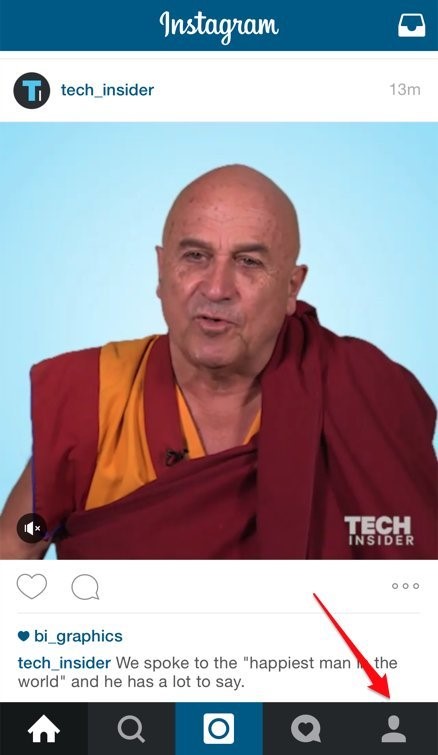
1. Mus rau koj qhov profile ntawm Instagram
2. Coj mus rhaub rau ntawm lub cim "duab ntawm koj"
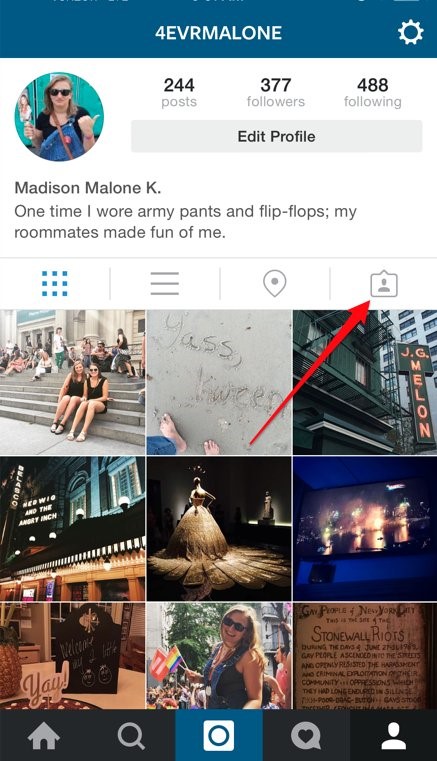
Nov yog qhov chaw uas koj cov duab uas tau cim tseg cia. Yog tias koj muaj ib daim duab uas koj tsis xav kom raug cim tseg lawm, nyeem tsab xov xwm no, thiab kuv yuav qhia koj yuav ua li cas tshem nws tawm ntawm koj qhov profile.
Yuav ua li cas kom tshem tawm koj tus kheej ntawm daim duab hauv Instagram?
Instagram tso cai rau koj tshem koj tus kheej tawm ntawm cov duab uas tau cim. Tsuas yog ib yam koj yuav tsum ua yog ua raws li cov kauj ruam no:
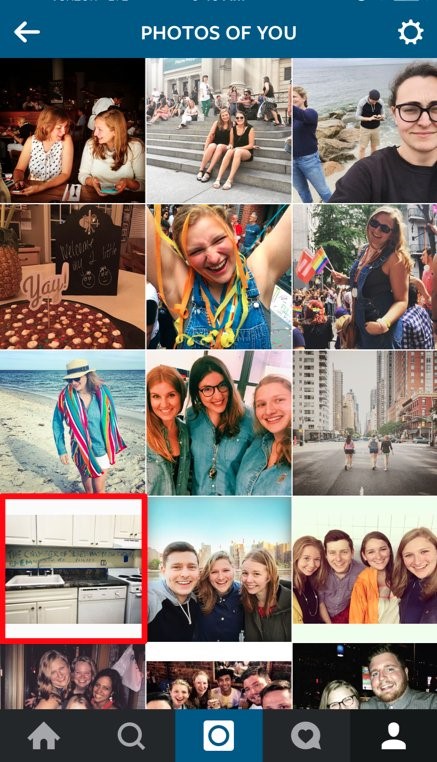
Kauj Ruam 1: Mus rau koj cov duab uas tau cim npe, raws li peb tau hais, thiab coj mus rhaub rau ntawm daim duab koj xav tshem tawm kom koj lub npe neeg siv tshwm sim.
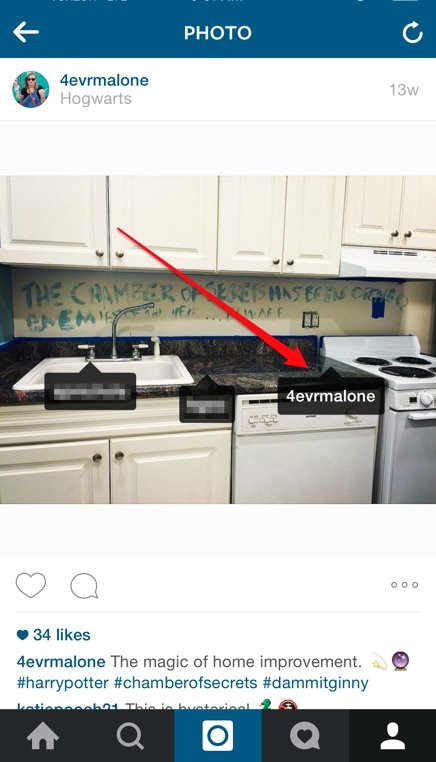
Kauj Ruam 2: Coj mus rhaub koj lub npe neeg siv.
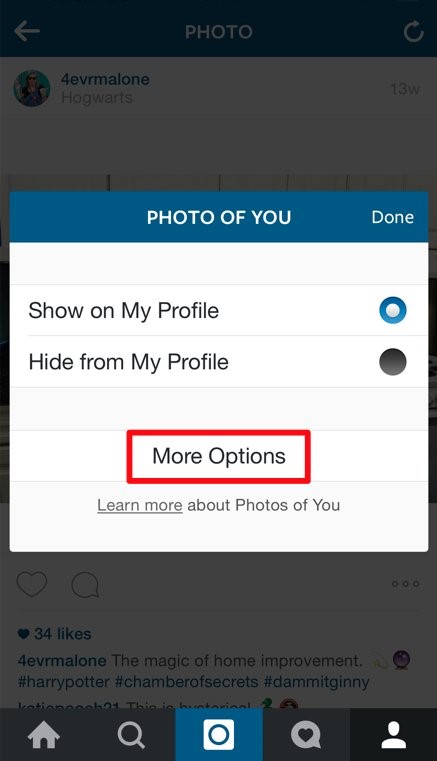
Kauj Ruam 3: coj mus rhaub rau ntawm "ntau txoj kev xaiv."
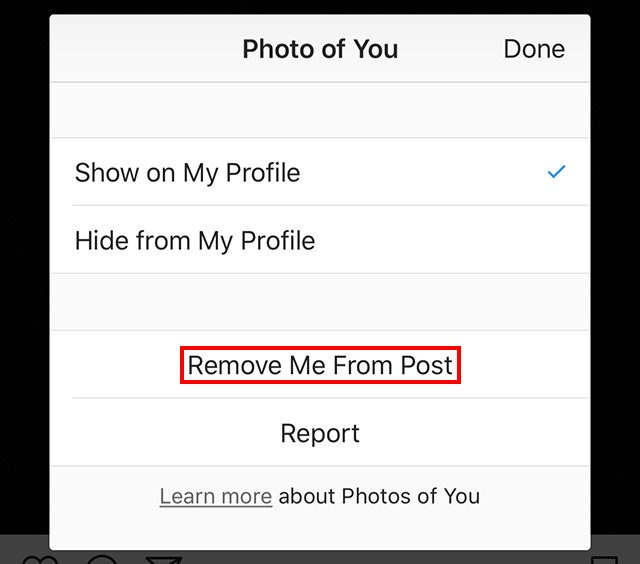
Kauj Ruam 4: Coj mus rhaub "Tshem kuv tawm ntawm qhov kev tshaj tawm."
Lus Cim: yog tias koj xav zais daim duab no ntawm koj qhov profile (thiab tsis yog kom tshem koj tus kheej tawm ntawm nws), coj mus rhaub rau ntawm "nkag ntawm kuv qhov profile."
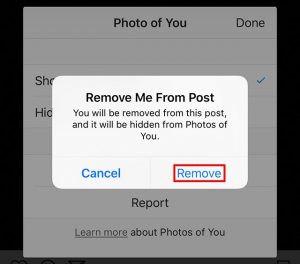
Kauj Ruam 5: Coj mus rhaub "tshem tawm" ntawm lub qhov rai lees paub uas tshwm sim. Qhov no yuav tshem koj tawm ntawm qhov kev tshaj tawm. Kuv kuj tseem yuav zais daim duab no ntawm koj qhov profile.
Thiab ua tiav lawm! Tsis muaj dab tsi yuav tsum txhawj txog.
Xaus lus
Kev nkaum thiab tshem tawm cov duab Instagram uas tau cim tseg yog qhov muaj txiaj ntsig zoo rau ntau yam xwm txheej txhua hnub, xws li kev tswj hwm tus kheej ntiag tug, tswj hwm cov duab tshaj lij, lossis ntxuav koj qhov profile yam tsis rho tawm cov ntsiab lus. Txawm hais tias koj raug cim tseg hauv daim duab tsis zoo nkauj, cov ntawv tshaj tawm qub, lossis cov ntsiab lus uas tsis phim koj cov qauv tam sim no, qhov kev xaiv Hide pab khaws koj qhov profile kom zoo. Ntawm qhov tod tes, qhov tshwj xeeb Unhide tso cai rau koj rov qab kho cov duab cim tseg thaum lawv rov qab los ua qhov tseem ceeb dua.
Tom qab nyeem tsab xov xwm no, cov neeg siv yuav tsum nkag siab meej txog thaum twg thiab yuav siv ob yam no li cas. Nrog cov kauj ruam zoo, koj tuaj yeem zais cov duab tsis xav tau thiab qhib lawv tom qab yog tias xav tau, daws ob qho teeb meem yam tsis cuam tshuam rau koj txoj kev sib raug zoo lossis cov ntawv tshaj tawm thawj.
Tsab ntawv no muaj txiaj ntsig li cas?
Nyem rau ntawm lub hnub qub kom ntsuas nws!
Qhov ntsuas nruab nrab / 5. Cov lej pov npav:

![Yuav Ua Li Cas Ntxiv Suab Paj Nruag Rau Hauv Zaj Dab Neeg Instagram [2023]](https://www.getappsolution.com/images/add-music-to-instagram-story-390x220.jpeg)